Key Guidelines:
- Sequence Setup: For all sequences in Adobe Premiere Pro and DaVinci Resolve, the designated master video codec should be used from the initial import to the final edits. This ensures consistency in video quality and efficient workflow management.
- Export Settings: Upon completion of the program content—whether it is a show, episode, or movie—the final export must also utilize this master codec. Using the same codec for export as was used in the sequence settings ensures that the final output maintains the highest quality and is compatible with intended distribution channels.
- Longevity and Archival Benefits: Multi-Generation Editing: The selected codec is robust enough to minimize quality degradation over multiple generations of editing. This is crucial when projects undergo various editing phases and need to be re-exported or adjusted over time.
- High-Quality Archiving: By using this codec, the final exported content is preserved in the highest possible quality. This is essential for archival purposes, ensuring that future retrievals and reuses of the content will meet the highest standards of clarity and integrity. Please refer to the subsequent sections for detailed instructions on how to configure your software settings and for recommendations on handling specific types of media within these frameworks.
Video Types:
- The Master (Texted): The Texted master is intended for publishing or transmission (TX) and will be delivered as a finalized product. It should not require any additional modification by AJ360 unless arranged beforehand. This version needs to be delivered with the following requirements:
Following our UHD format
- AJ360 Intro and any requested outro/end credits should be included.
- Any required subtitles or captions must be delivered separately as an SRT file and should match the final timecodes.
- This master must be produced with timecode that precisely matches the Textless/Clean master.
- The Screener Version (Publishing): Ongoing productions, exceptionally, should be delivered in Screening Version (HD format) prior to final Master Version (UHD format) delivery to expedite processing and publishing times. This arrangement should be coordinated with the production team based on the program’s specific requirements. This version needs to be delivered with the following requirements:
Following our HD format
- AJ360 Intro and any requested outro/end credits should be included.
- Any required subtitles or captions must be delivered separately as an SRT file and should match the final timecodes.
- This master must be produced with timecode that precisely matches the Textless/Clean master.
- The Clean (Textless): Every program produced for AJ360 must include a Textless/Clean master for other network channels and potential sale. This version needs to be delivered with the following requirements:
Following our UHD format
- This master must be synchronized with timecode identical to the Texted master.
- All textual elements such as subtitles, supers, astons, captions, or straps must be removed. There should be no on-screen text during the program unless agreed upon beforehand.
Export Settings:
- HD Format: Screening Version
Ongoing productions, exceptionally, should be delivered in HD prior to final UHD delivery to expedite processing and publishing times. This arrangement should be coordinated with the production team based on the program’s specific requirements.
| Type | Value |
| Wrapper | Mp4 |
| Video Codec | H264 |
| Frame Size | 1920×1080 |
| Frame Rate | 25 |
| Aspect | Square Pixels (1.0) |
| Bit depth | 8 bits |
| Colour space | YUV |
| Matrix coefficients | BT.709 |
| Field Order | No Fields (Progressive Scan) |
| Chroma subsampling | 4:2:0 |
| Bit rate | 20 Mb/s |
| Render at Maximum Depth | YES |
| Enable Smart Rendering codec | YES |
| Use Maximum Render Quality | YES |
| Time interpolation | Frame Sampling |
| Audio Codec | Uncompressed |
| Sample Rate | 48000 Hz |
| Sample Size | 24 bit |
| Audio Peak Level | -2 dBTP ( true-peak level ) |
| Target loudness | -23 LUFS (follow EBU R 128 standard) |
| Audio Stream 1 | Stereo (L & R channels) – Arabic |
2. UHD Format :
All programs must be shot and delivered in the following format.
- 3840×2160 – 25 frames per second
- 4:2:2 colour sub sampling
2.1 UHD Acquisition and Delivery Format
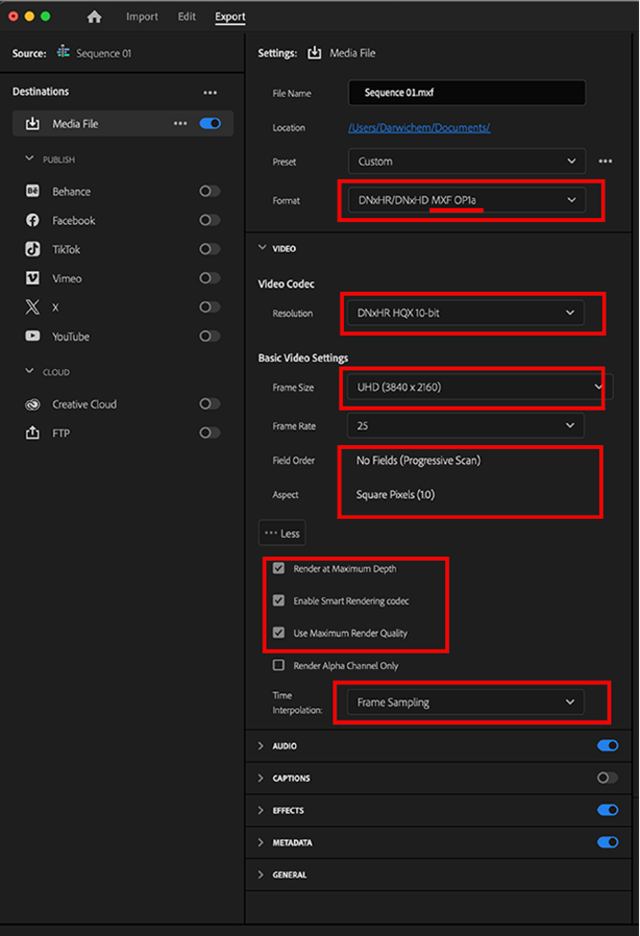
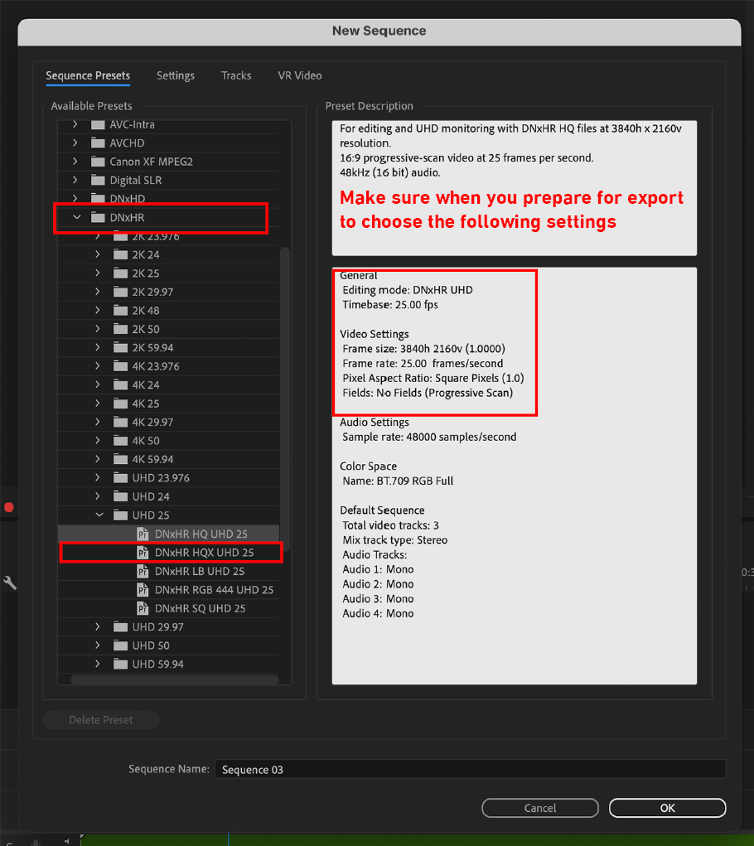
Codec for the production and content archive is “DNxHR HQX 10-bit” in UHD video resolution (3840 x 2160)
This are detail Sequence and Export specification (Adobe premiere PRO example):
| Type | Value |
| Format | DNxHR/DNxHD MXF OP1a |
| Video Codec | DNxHR HQX 10-bit |
| Frame Size | UHD (3840 x 2160) |
| Frame Rate | 25 frames per second (25p) |
| Pixel Aspect Ratio | Square Pixels (1.0) |
| Bit depth | Maximum depth (10 bits is the minimum requirement) |
| Colour space | 4:2:2 YUV |
| Field Order | No Fields (Progressive Scan) |
| Render at Maximum Depth | YES |
| Enable Smart Rendering codec | YES |
| Use Maximum Render Quality | YES (Encoding Profile = High) |
| Start Time Code | 00:00:00:00 |
| Time interpolation | Frame blending might be better option overall |
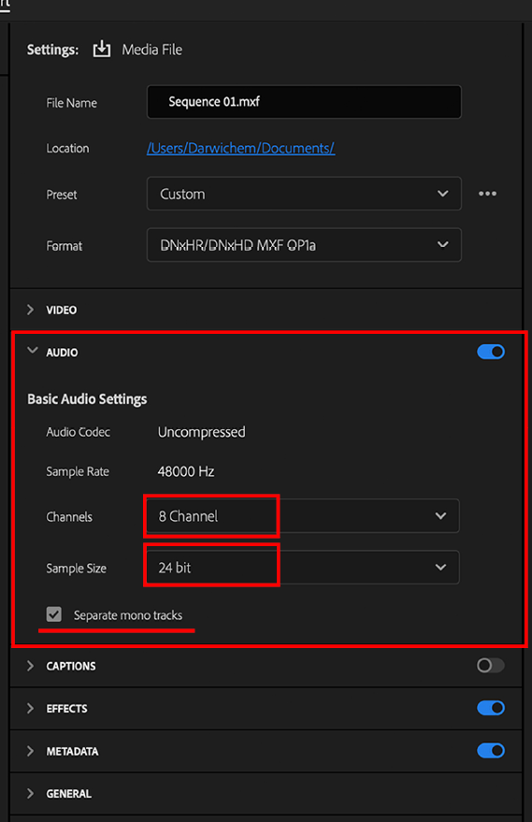
| Audio Codec | PCM (Uncompressed) |
| Sample Rate | 48000 Hz |
| Sample Size | 24-bit |
| Audio Peak Level | -2 dBTP true-peak |
| Target loudness | -23 LUFS (follow EBU R 128 standard) |
| Audio Channels | 8 channels |
| Audio Channel 1 | Main Stereo Left – Arabic |
| Audio Channel 2 | Main Stereo Right – Arabic |
| Audio Channel 3 | Main Stereo Left – English |
| Audio Channel 4 | Main Stereo Right – English |
| Audio Channel 5 | M&E or Mix Minus Narration Stereo Left |
| Audio Channel 6 | M&E or Mix Minus Narration Stereo Right |
| Audio Channel 7 | Original voice over (Arabic) |
| Audio Channel 8 | Dubbed voice over (English) |
- All channels must be DISCRETE
- Channels 1&2 must be Final Mix Woth Arabic speaker
- Channels 3&4 must be Final Mix Woth Arabic speaker (if so agreed)
- Tracks must be laid out sequentially (as noted in the above table).
- If production is done in 4K, the video needs to be CROPPED to fit into UHD
All video assets should be delivered following the export settings above.
The following instructions guide users through the process of preparing an Adobe Premiere project for export with 8 discrete audio channels. This process ensures each audio channel is treated as an individual, distinct track. The steps detailed in this section include setting up the project, configuring the audio tracks, and correctly assigning audio channels for export.
Screenshot of Adobe Premiere PRO export settings:
The following instructions guide users through the process of preparing an Adobe Premiere project for export with 8 discrete audio channels. This process ensures each audio channel is treated as an individual, distinct track. The steps detailed in this section include setting up the project, configuring the audio tracks, and correctly assigning audio channels for export.
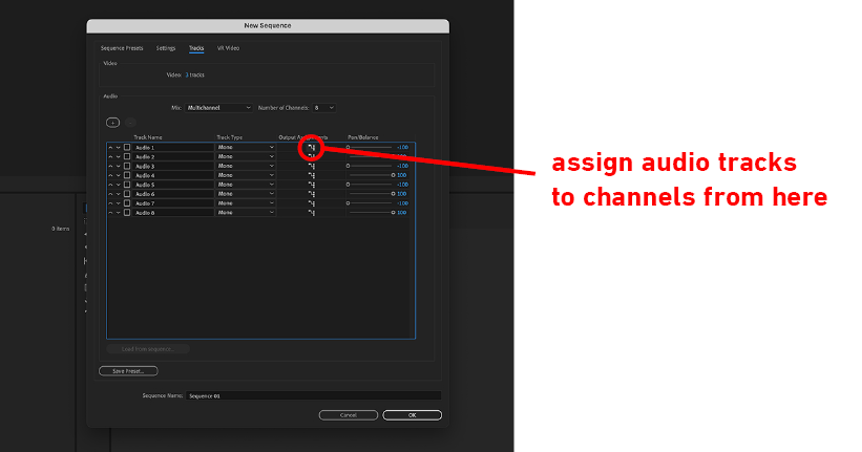
Screenshots 1: Multi-Channel Project Setup
This screenshot shows the initial setup required for exporting multiple audio channels. It emphasizes the importance of selecting “8 multichannels” and ensuring that all audio tracks are set to “Mono.” This configuration is critical as it lays the foundation for correctly panning each audio track. Proper panning ensures that each track is treated as a separate audio channel, which is necessary for discrete channel exports.
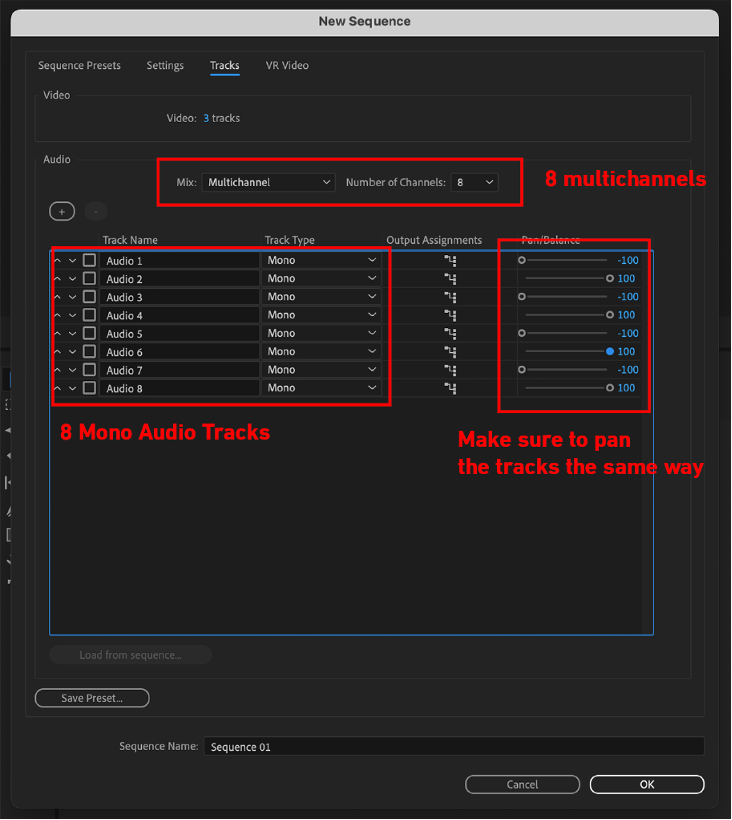
Screenshots 2: Audio Track Assignment
The second screenshot demonstrates how to assign audio tracks to specific channels. Here, users are instructed to assign each audio track to corresponding mix track channels. For instance, audio track 1 and 2 should be assigned to mix track channels 1 and 2, respectively. This step needs to be repeated for all audio tracks, ensuring that each one is correctly routed to the appropriate channel. This meticulous assignment is crucial for maintaining the integrity of discrete audio channels during the export process.
Screenshots 3: Export Settings
The final screenshot illustrates the export settings within Adobe Premiere. This section consolidates the previous steps and shows the final adjustments needed before exporting the project. Video Editor must review and ensure that all settings align with the requirements for exporting 8 discrete audio channels. This includes verifying the channel assignments and confirming that the project is set to export as intended, with each audio track preserved as a separate channel.